Herdr plugin
The Herdr plugin shows your usage right in the Herdr sidebar. Each pane gets the numbers for the agent it’s actually running, so a Claude pane and a Codex pane show their own figures side by side.
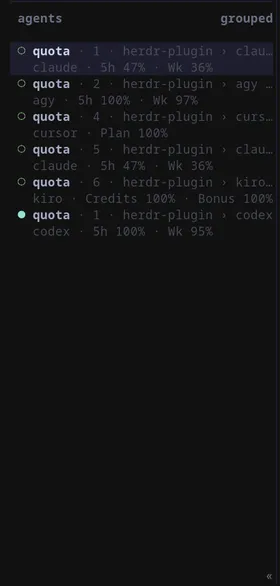
It’s a thin wrapper around quota-cli, so it uses the same credentials and supports the same providers.
Install
Section titled “Install”-
Install
quota-clifirst. The plugin won’t work without it.cargo install quota-cliPrebuilt Linux and Windows binaries are on the quota-cli page too. Either way,
quota-clihas to be on yourPATH. -
Install the plugin:
herdr plugin install pinkpixel-dev/quota/herdr-plugin -
Add
$quotato a sidebar row in~/.config/herdr/config.toml. The plugin doesn’t touch your config, so this part is up to you:[ui.sidebar.agents]rows = [["state_icon", "machine", "workspace", "tab"], ["agent", "$quota"]]The spaces sidebar works the same way under
[ui.sidebar.spaces]. Put$quotawherever it fits your layout. -
Reload the config:
herdr server reload-config
What it shows
Section titled “What it shows”| Agent kind | Shows | Meaning |
|---|---|---|
claude, claude-code, anthropic |
5h, Wk |
Rolling 5 hour and weekly windows |
codex |
Window lengths from the API | Usually 5h and Wk |
cursor |
Plan |
The current billing cycle |
agy, antigravity, antigravity-cli |
5h, Wk |
The Gemini model windows |
grok |
Credit |
The credit pool for the billing period |
kiro |
Credits, Bonus |
Base credits, and a bonus or trial pool when you have one |
The percentages are what you have left. Only providers with a pane on screen get fetched, so a Codex pane never costs you a Cursor request. If no pane is running a supported agent, the plugin does nothing.
A workspace row only gets a number when every pane in it runs the same agent. In a mixed workspace a single number would look like it applied to all of them, so only the pane rows show usage there.
Keeping it up to date
Section titled “Keeping it up to date”Herdr has no timer event, so usage updates when Herdr starts, when an agent shows up in a pane, when a pane’s agent status changes, when you focus a pane, and when you run the plugin’s refresh action. Values are cached for 120 seconds, so a number can lag by about two minutes.
To refresh on demand, bind the refresh action to a key. prefix+u is just an example:
[[keys.command]]key = "prefix+u"type = "plugin_action"command = "pinkpixel.quota.refresh"description = "refresh Quota usage"If you’d rather it just stayed current, run the watcher in a pane or as a service:
quota-cli herdr watch --interval 300On Linux, a systemd user service works well. Save this as ~/.config/systemd/user/quota-herdr.service:
[Unit]Description=Quota usage in the Herdr sidebar
[Service]ExecStart=%h/.cargo/bin/quota-cli herdr watch --interval 300Restart=on-failure
[Install]WantedBy=default.target
Then enable it:
systemctl --user enable --now quota-herdr.serviceA watcher started this way runs outside Herdr, so it keeps its own cache in your temp directory. It reports the same numbers to the same panes, and it’s fine to start it before Herdr.
When the sidebar shows nothing
Section titled “When the sidebar shows nothing”A blank $quota usually means one of these:
- No pane is running a supported agent.
- You’re not signed into that provider’s CLI, or the token expired.
quota-cliisn’t on yourPATH.- The last fetch failed and there’s no cached value yet.
Start with the CLI, since it prints the actual reason for each provider:
quota-cli usageIf that looks right but the sidebar doesn’t, check the plugin’s recent runs:
herdr plugin log list --plugin pinkpixel.quotaWorking from a local checkout? Link the plugin folder instead of installing it:
herdr plugin link /path/to/quota/herdr-plugin